The Missing Layer in Enterprise AI
.webp)
.webp)
.webp)
TL;DR: Most enterprise AI has an adoption problem. The technology works but users don't engage with it, because every AI product today asks people to change how they work. Contextual UI is a new category that inverts this: instead of asking users to go to the AI, the interface observes how each user actually works and quietly shapes itself around them, with no setup, no prompts, and no behavior change required.
-----------------------------------------------------------------------------------------------------------------------------------------------------------
A sales rep opens her CRM every morning.
The system knows she wins more often when she gets a second meeting in week one. It knows her top accounts cluster in two industries. It knows she checks deal size and last activity before every update.
She has no idea the system knows any of this. She sees the same screen as a rep who joined last month.
We've made AI 10x smarter in two years. The interface it lives in hasn't changed at all.
The AI adoption problem is not an AI problem. It's a UI problem.
We call the solution Contextual UI: an interface layer that observes how each user actually works and quietly shapes itself around them, with no prompts, no setup, and no behavior change required. The rest of this post is the case for why it's the missing layer in the AI stack.
Every AI product being built today asks users to change how they work. Open a new panel. Learn a new interaction model. Type prompts into a chat box. That's a big ask for someone who already knows how to get their job done. Most people don't bother. They close the panel and go back to clicking through the interface they already know.
We've spent all our energy making the AI smarter and almost none of it thinking about where the AI actually shows up.
The industry is solving the wrong problem
The big platforms have mostly decided the answer is to get rid of the interface altogether. Salesforce launched Headless 360 at TDX 2026, exposing everything as APIs so agents can operate the CRM without anyone opening a browser. ServiceNow, SAP, and Microsoft are making similar moves. The logic is: if agents handle the work, the UI doesn't matter.
That's right for automated workflows. But most knowledge workers still open their software every day and click through it themselves. The interface isn't going away. It's just being ignored by the people who should be rethinking it.
On the developer side there's a different bet: agent-driven UI. Google's A2UI specification and CopilotKit's AG-UI protocol are building infrastructure for interfaces that adapt in real time based on conversation context. Smart work, serious investment.
But there's a real problem waiting at the end of that road: muscle memory. Users know where the save button is, which tab has the report, the exact sequence of clicks to close a deal. When the interface shifts underneath them that automatic knowledge stops working. A layout that changes every session isn't personalized. It's disorienting.
Then there's chat, which is where most AI products land by default. It avoids the layout problem but creates a different one: the blank canvas. A text box requires knowing what to ask, how to phrase it, and what the system can even do. Most people don't engage with it consistently. They default to what they know.
Salesforce and Microsoft Dynamics both embedded inside Outlook and Gmail at some point. The insight was about reducing friction. The intelligence came to users where they already were, with no behavior change required. Salesforce is making the same bet with Slack, positioning it as the primary surface for Agentforce. Smart instinct. But moving the chat box into Slack doesn't solve the blank canvas problem. It's still a text box. You still have to know what to ask.
What the interface should actually do
The question nobody is asking is: what if the interface learned how each user works and quietly shaped itself around them?
Not a dynamic layout that reshuffles every session. Not a chat box waiting for questions. A default that's good enough on day one and gets better over time as the system watches what each person actually does. Which records they open. Which fields they check first. What they do right before logging a call or updating a stage.
After a few weeks it has enough signal to offer something specific. "We noticed you check last activity and deal size on every opportunity before updating it. Want us to add those to your default view?" Or: "You navigate to email history before every call. Want a shortcut in your sidebar?" The user says yes or no. The interface adjusts on their terms and then holds still.
Their screen starts to look different from a colleague's. Not because the system decided to make it different but because they shaped it, one small choice at a time, to fit how they work. That's muscle memory working in your favor instead of against you.
Chat still belongs in this picture, for complex requests or when someone wants to make a bigger change. But as a tool users reach for, not the thing the system makes them go through every time.
The context graph problem nobody talks about
Everyone in enterprise AI is building context graphs right now. A unified picture of customers, accounts, relationships, and history that agents can reason over. It's real and it matters.
But the conversation always stops at the data layer. Nobody asks how that intelligence actually gets to the person sitting in front of the software.
Here's the gap. The graph knows this sales rep has six deals closing this quarter, that she consistently wins when she gets a second meeting in the first week, and that her top accounts are concentrated in two industries. That knowledge is powering agent reasoning somewhere in the background. But the CRM she opens every morning has no idea. She sees the same screen as a rep who joined last month.
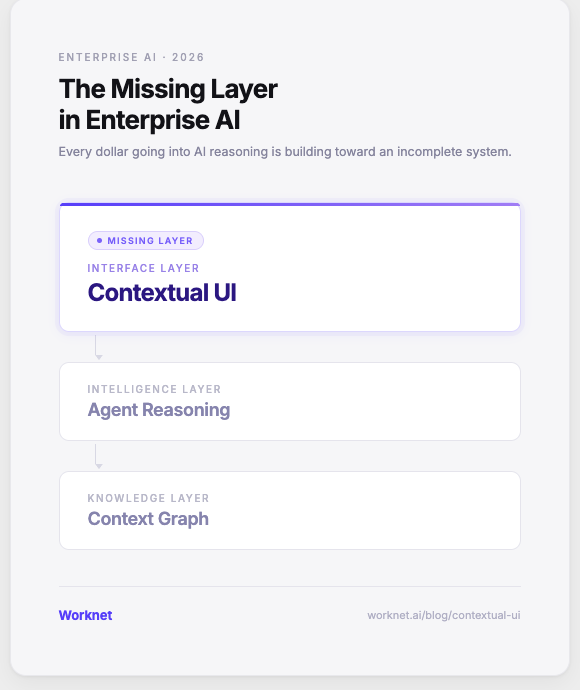
The context graph captures what's known. Agent reasoning decides what to do with it. But there's a missing layer between that reasoning and the person doing the work. That's the layer that should be shaping the interface she sees every day. Right now it doesn't exist as a category. That's the gap we're building for.
What we're building at Worknet
Worknet is an AI adoption agent for the software your customers use and the software your employees use. It sits with every user inside the app, offering proactive support and onboarding. It answers with context, acts on the user's behalf within the permissions you set, and brings in the right person from your team when needed. For SaaS companies, what it learns becomes expansion signals for sales, risk alerts for success, and fixes for product. For IT, it rolls out across the apps you buy with no vendor changes and shows where employees get stuck. An AI-native alternative to Pendo, WalkMe and Appcues.
The problem we kept hearing from customers wasn't that their AI was bad. It was that usage was far lower than anyone expected. The assistant sat there. People ignored it and did things the way they always had.
We came to believe the whole framing was wrong. AI shouldn't be a tool people go to. It should be embedded in the software they're already in, working quietly in the background, and the only thing users notice is that their software got smarter.
We read the live interface, observe what each user actually does, and surface relevant suggestions directly inside whatever software they're using. No setup. No prompts. No behavior change required. The hard part isn't generating suggestions. It's reading software that was never built to be read, and knowing when to surface something versus when to stay out of the way. That calibration matters as much as anything else. Today that means proactive suggestions and contextual actions inside the existing UI. The next step -- where the interface itself gradually adapts based on observed behavior -- is where we're heading.
The surface stays familiar. The intelligence underneath it improves. Users don't adopt a new tool. They just find that work got a little easier, then a little easier again.
We call this Contextual UI. We think it's what's been missing from the AI stack. If you're thinking about the same problem, reach out.
FAQ's
What is Contextual UI? Contextual UI is an interface layer that observes how each user actually works, surfaces personalized suggestions based on their real behavior, and shapes the interface around them over time. Unlike dynamic UI that reshuffles every session or chat that waits to be asked, Contextual UI adapts once per user and then holds still, preserving the familiarity users depend on while making the interface genuinely fit how they work.
Why is AI adoption low in enterprise software? Most AI products require a behavior change: open a panel, type a prompt, engage with a new interaction model. Most users don't do this consistently, not because the AI isn't useful but because changing how you work has a cost. Contextual UI removes that requirement entirely by surfacing intelligence inside the interface users already know, without asking them to do anything differently.
How is Contextual UI different from generative UI? Generative UI (as being built by Google with A2UI and CopilotKit with AG-UI) generates interfaces dynamically per session based on conversation context. Contextual UI generates a personalized interface once per user and refines it slowly over time. One optimizes for real-time flexibility, the other for familiarity and compounding personalization.
How is Contextual UI different from digital adoption platforms like WalkMe or Pendo? Digital adoption platforms rely on authored content: a human writes tooltips and rules that fire when conditions match. This works for predictable onboarding flows but breaks for dynamic, complex workflows where every user's situation is different. Contextual UI uses continuous LLM reasoning over live interface state, with no authored content, no setup, and no rules to maintain.
What is the relationship between context graphs and Contextual UI? Context graphs capture what's known about customers, accounts, and relationships to power agent reasoning. Contextual UI is the interface layer that surfaces that intelligence to the user in their daily workflow. Without it, the context graph's intelligence stays in the background and never reaches the person doing the work. Contextual UI is the missing third layer between data and the user.
What does Worknet's Contextual UI do in practice? Worknet reads the live interface, observes what each user actually does, and surfaces relevant suggestions directly inside whatever software they're already using. No implementation sprint, no content to author. Over time it notices patterns and offers to adjust the interface: adding frequently used fields to a default view, creating shortcuts for repeated navigation, surfacing the right data at the right moment. The user approves or declines each change. The interface becomes theirs.
.png)


